Want to create equal height columns with CSS. Looks like faux columns is the best choice.
http://www.positioniseverything.net/articles/onetruelayout/equalheight
http://www.ejeliot.com/blog/61
Want to create equal height columns with CSS. Looks like faux columns is the best choice.
http://www.positioniseverything.net/articles/onetruelayout/equalheight
http://www.ejeliot.com/blog/61
Why on earth do 68% of my website visitors use IE/Win?
Anyway, after banging my head around with CSS to get semantic markup to work with IE and a bunch of other things, I have given up for now.
Just bookmarking some pages about the 'hasLayout' property in IE for future review.
http://www.brunildo.org/test/IEABlock.html
http://www.brunildo.org/test/IEABlock1.html
http://www.satzansatz.de/cssd/onhavinglayout.html
An MSDN article on the hasLayout property:
http://msdn.microsoft.com/en-us/library/bb250481.aspx
The Escaping Floats bug:
http://www.positioniseverything.net/explorer/escape-floats.html
The Peekaboo bug (Disappearing text!)
http://www.positioniseverything.net/explorer/peekaboo.html
The Holly hack to fix these (no longer valid because of IE7): Using the mysterious box outside the html tag (who discovered this man!?)
http://www.communitymx.com/content/article.cfm?page=2&cid=C37E0
The new solution for holly hack [by creating that extra container using conditional comments The #IERoot method:
http://www.positioniseverything.net/articles/cc-plus.html
One of the common problems I come across when creating a picture gallery, is to vertically align images.
Say, I have 4 images, with variable height and width, but fixed max-height and max-width and a title underneath.
I could use
   <div style="float:left; margin-right:10px;">
  <div class="outerbox" style="width:100px; height:100px; border:1px solid #999;">
  <img="src=path" class="innerbox"/>
  </div>
  <div>Title</div>
</div>
I will get an image gallery which looks like this:

Here, if I want to center the images inside the grey box, I just need to add the declaration, text-align:middle, to the container, however, if I want to vertically align these, I have nothing that I can use, short of using tables with a valign attribute. This is because the 'vertical-align' style declaration does not mimic 'valign' in all cases. A detailed analysis of vertical-align by Gary Kistner can be found here.
Initally, I was delighted to see that upon giving the div tag a display property of 'table-cell' it uses it implements like a valign tag. [click to enlarge]
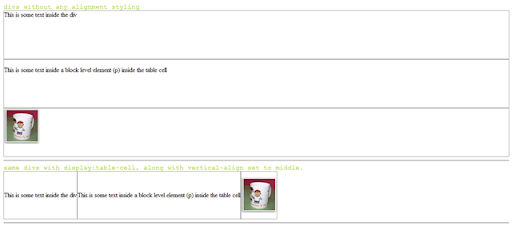
But unfortunately, IE6 does not support this. For a detailed description on how browsers implement the display property, visit this page on quirksmode.
The previous article by Gavin Kistner offers two workarounds.
Method one works in the following way (I call it the Duck and Head-up method): assuming a fixed height for the inner content (im my example the img with class innerbox), position it absolutely inside the container (outerbox) with the top-edge at 50% of the outerbox height. Now move back the innerbox up by half its own height, by using margin-top:-y, (y=half of inner box height).
I haven't tried this, simply because in my case, the inner content does not have a fixed height.
The second may perhaps work because it assumes a single line of text inside the box (which a single inline image should be) and a fixed height for the outerbox, (which is true in my case), and then setting the line-height for the parent (outerbox) to the fixed-height. Let's see how that works. Sadly, it only works in the case of text. probably because it relates to font-size and not image-height [In the following example, text-height + above and below height = 140 which was the specified line-height]

[In the above example, height declaration replaced by line-height declaration]
I came up with a workaround which included some additional mark-up. Add a non-breaking space ( ) before the image, set the font-size to 1px and increase the outer-box width a little; that way the image is seen as a part of the running text and Mozilla and Safari render this correctly [look at the second box]. But as always IE6 refuses to implement it this way! Sigh.

Finally, this site seems to have find a solution using a font-height declaration for IE6 and then hiding it from other browsers. CSS vertical-align.
But clearly if you want an excess mark-up and hack free solution, tables are probably your only resort - at least for an image gallery.
I don't hate tables at all - unlike what pretty much all CSS proponents would have you do. They have their uses. What I don't like is adding cellpadding, cellspacing and border attributes in each table tag, making my mark-up look ugly and unreadable.
I recently found the really cool border-collapse CSS property, which seems to solve the issue. This post is just to fine-tune it and test it across browsers.
Unfortunately, inline style declarations (as in a <style></style> statement) seem to be unsupported by Blogger. So I guess I just have to have to paste screenshots.
FF 2.0.0.10
IE 6
So, for a table with, say, class 'sample_table', this is what you need to do:
table.sample_table{border-collapse:collapse;} /*removes cellspacing and border*/
table.sample_table td{padding:0;} /*removes cellpadding*/
[just .sample_table will also work]
Batch processing in Photoshop can be a real time saver, but of course it's a sheer waste of effort if you have to press 'Ok' after each action is completed. Which is what happens if you are saving .jpg files, because a .jpg save action dialog box pops up.
I couldn't find an answer to this, until I did some googling and looked up Adobe Help. Here's how it works.
1. First off you need to include Save As and Close in your action. [Remember to use Save As and not Save, or else it would not work].
2. Next, when you are creating your Batch process, tick the Override Save As options checkbox. Voila! No more JPEG options.
Thanks to: http://forums.macosxhints.com/archive/index.php/t-25180.html
Ever heard of conditional comments? Well, I hadn't - but they might be the perfect solution to tackling the idiosyncrasies of IE when dealing with CSS.
I have to delve into them further - particularly - using expressions within a style declaration (such as on the Burrp sign-up page).
Usage:
<!--[if IE 6]>
Special instructions for IE 6 here
<![endif]-->
I would recommend putting this and the entire link statement for your standard stylesheet in a separate file such as style.jsp or style.php and then use it as an include.
Also, if you are using multiple IEs for testing, the conditional comments won't work - however, they will in actual practice.
| This is a table |
float:left Then I have to start worrying about clearing floats - for which there is no single multiple browser compatible CSS-only solution.display:inline Which means I can't apply any dimensions. No width, height, margin or padding [only left and right margin/padding apply if specified]display:inline-block Not many takers (browsers)